A2A Is the Task
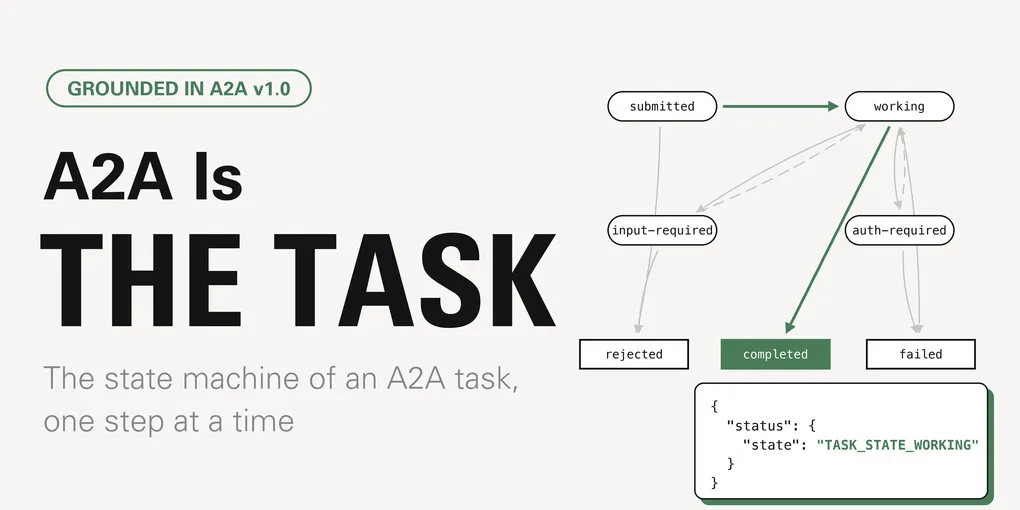
Every conversation I have about A2A eventually arrives at the same question: couldn’t you just do this with MCP? The honest answer is “mostly, yes,” and I think A2A fans would be better served by saying so out loud. In this month’s deep dive I set out to figure out what’s doable in A2A that you can’t do with MCP. I think the approach to tasks really highlights the nature of how these two protocols approach agentic interaction, and that’s the interesting part in my opinion. Unfortunately, it gets lost when we pretend the two protocols have nothing in common.
In this post I attempt to isolate that part. In short: A2A has one primitive that MCP does not have in the same shape, and it is the Task. With small housekeeping exceptions, anything in A2A either produces a task, feeds one, or watches one. As the centerpiece of A2A, I’ll explore this object and its state machine in depth. As in other posts on my blog, there are interactive components you can use to navigate the state machine yourself, so feel free to drive the tasks as you see fit!
Disclosure, as usual: I work at Arcade, where my days are mostly MCP. I’m also an AAIF ambassador, which motivated me to look closer at A2A, and I am not neutral about any of this. I am, however, trying to be accurate, and every claim about the protocols below is grounded in the A2A specification and the MCP Tasks extension.
The “MCP vs A2A” conversation
Most “MCP vs A2A” conversations take the same basic shape. Take an agent. Put an
MCP server in front of it with a single tool,
ask_agent(prompt), that forwards the prompt and returns whatever the agent
says. Now list what you have:
- Discovery.
tools/listtells the caller what the agent can do. Add a description and you have something that looks a lot like an Agent Card. - Skills. One tool per skill, each with an input schema. Depending on the implementation, it’s even more precise than A2A’s prose-and-tags skills.
- Auth. OAuth at the transport.
- Long-running work. A former MCP limitation, now the
MCP Tasks extension
(
io.modelcontextprotocol/tasks) gives you a durable task handle,workingandinput_requiredand terminal states, polling withtasks/get, a way to answer mid-flight questions withtasks/update, cooperative cancellation, and push notifications. It is very much happening, and it is good.
So what’s left? Let’s look at the same request in both envelopes.
Request
{ "jsonrpc": "2.0", "id": 1, "method": "SendMessage", "params": { "message": { "messageId": "msg-01", "role": "ROLE_USER", "parts": [ { "text": "Chart last quarter’s churn by month." } ] } }}
Response
{ "jsonrpc": "2.0", "id": 1, "result": { "task": { "id": "task-01", "contextId": "ctx-3e8a", "status": { "state": "TASK_STATE_SUBMITTED", "timestamp": "2026-08-28T14:02:11Z" }, "history": [ { "messageId": "msg-01", "role": "ROLE_USER", "parts": [ { "text": "Chart last quarter’s churn by month." } ] } ], "artifacts": [] } }}
Text version: the same request as an MCP tool call and as an A2A message
MCP: tools/call with the Tasks extension
// request
{
  "jsonrpc": "2.0",
  "id": 1,
  "method": "tools/call",
  "params": {
    "name": "ask_analyst",
    "arguments": {
      "prompt": "Chart last quarter’s churn by month."
    },
    "_meta": {
      "io.modelcontextprotocol/clientCapabilities": {
        "extensions": {
          "io.modelcontextprotocol/tasks": {}
        }
      }
    }
  }
}

// response
{
  "jsonrpc": "2.0",
  "id": 1,
  "result": {
    "resultType": "task",
    "task": {
      "taskId": "mcp-7c2e",
      "status": "working",
      "ttlMs": 600000,
      "pollIntervalMs": 2000,
      "createdAt": "2026-08-28T14:02:11Z"
    }
  }
}
A2A: SendMessage
// request
{
  "jsonrpc": "2.0",
  "id": 1,
  "method": "SendMessage",
  "params": {
    "message": {
      "messageId": "msg-01",
      "role": "ROLE_USER",
      "parts": [
        {
          "text": "Chart last quarter’s churn by month."
        }
      ]
    }
  }
}

// response
{
  "jsonrpc": "2.0",
  "id": 1,
  "result": {
    "task": {
      "id": "task-01",
      "contextId": "ctx-3e8a",
      "status": {
        "state": "TASK_STATE_SUBMITTED",
        "timestamp": "2026-08-28T14:02:11Z"
      },
      "history": [
        {
          "messageId": "msg-01",
          "role": "ROLE_USER",
          "parts": [
            {
              "text": "Chart last quarter’s churn by month."
            }
          ]
        }
      ],
      "artifacts": []
    }
  }
}| Field | Present in | Meaning |
|---|---|---|
| resultType: "task" | MCP only | Tells the client the response is a task handle rather than the tool result. |
| ttlMs, pollIntervalMs | MCP only | How long the result stays fetchable and how often to poll. |
| contextId | A2A only | The conversation this task belongs to. Other tasks can share it. |
| history | A2A only | Messages exchanged so far, from both sides. |
| artifacts | A2A only | Outputs. Empty now; fills in over the life of the task, possibly in chunks. |
| status | Both | MCP: a bare string. A2A: an object with state, timestamp and an optional message. |
The MCP task is a receipt. It stands in for one request, it has a TTL, and when it completes, its result is exactly what that one request would have returned if it had been fast. The A2A task is a thread. It belongs to a context that other tasks can share, it carries the history of messages from both sides, and its outputs are a list that fills in over time. Both are called tasks. They are wrapping different things.
Here is the full comparison, including the rows where the answer is “same”:
| MCP task | A2A task | |
|---|---|---|
| What it wraps | One request. result is what the request would have returned synchronously. | A collaboration: a history of messages from both sides, plus zero or more artifacts. |
| Who decides to create one | The server, per request. | The agent, per message (the Message-or-Task fork). |
| Pause for input | input_required, answered via tasks/update with structured inputResponses. | input-required, answered with a new Message carrying the same taskId. Free-form, multimodal. |
| Pause for auth | No state of its own: input_required plus a URL-mode elicitation, consent out of band. | auth-required is a first-class task state. |
| Decline | By convention: an error code, or refusal text in a result. No standard refusal state. | rejected, distinct from failed. |
| Output arrives | Once, at completed. | Incrementally, as TaskArtifactUpdateEvent chunks with append and lastChunk. |
| Relationship between tasks | None. The handle ties operations to one task, never tasks to each other. | contextId groups them; referenceTaskIds links refinements. |
| After terminal | Result stays fetchable until the TTL expires. | Closed forever. A refinement is a new task in the same context. |
| Cancel | Cooperative. | Cooperative; TaskNotCancelableError when refused. |
| Delivery | Poll tasks/get, or notifications/tasks. | Poll GetTask, stream, or push to a webhook. |
From that table we can see how the two protocols approach tasks in a way that reminds me of parallel evolution.
- Convergent traits: pausing for input and cooperative cancel are nearly identical.
Pausing for auth and declining are both expressible in MCP, as conventions
layered on
input_requiredand error codes. A2A achieves the same with a stronger contract, giving each a named state instead. - Divergent traits: A2A allows for partial delivery and retains the context of one or multiple tasks that you can group. MCP does not have a convention for this at all.
In the scenarios below I walk through A2A-optimized task “threads”. A2A is a natural choice for some of these scenarios, which would be difficult to generalize using MCP.
The pieces on the board
I present 7 distinct scenarios below, but the actors are all the same:
- Your agent. The client. A personal agent that runs on your behalf and delegates work it can’t do itself.
- The Analyst. The remote agent. Run by another team, it has access to the data warehouse and, if you allow it, the billing system. It is the A2A server in every scenario.
- The warehouse and the billing system. Behind the Analyst. You never talk to them, but they cause most of the interesting states.
Message,Part,Task,TaskStatus,Artifact. The nouns. AMessageis what either side says, made ofParts (text, file, structured data). ATaskis the unit of work.TaskStatusis its current state plus an optional message explaining that state. AnArtifactis an output.contextIdandtaskId. The context is the conversation. The task is one piece of work inside it. Several tasks can live in one context.
Setup: the Agent Card
Like MCP, A2A has a discovery step
that allows the client and server agent
to negotiate capabilities and expectations of their interactions.
The Analyst publishes an Agent Card at
/.well-known/agent-card.json. Your (client) agent fetches it once.
- Churn analysis Churn rates by month, region, cohort or plan.
- Revenue joins Joins usage metrics with billing revenue. Requires your consent for billing access.
- Aggregate exports CSV exports of aggregates. Never exports PII.
{ "name": "Analyst", "description": "Answers questions about product usage, churn and revenue from the warehouse and the billing system.", "supportedInterfaces": [ { "url": "https://analyst.example/a2a", "protocolBinding": "JSONRPC", "protocolVersion": "1.0" } ], "provider": { "url": "https://analyst.example", "organization": "Data Platform Team" }, "version": "2.3.0", "capabilities": { "streaming": true, "pushNotifications": true, "extendedAgentCard": false }, "securitySchemes": { "bearer": { "httpAuthSecurityScheme": { "scheme": "bearer" } } }, "securityRequirements": [ { "schemes": { "bearer": { "list": [] } } } ], "defaultInputModes": [ "text/plain" ], "defaultOutputModes": [ "text/plain", "text/csv" ], "skills": [ { "id": "churn", "name": "Churn analysis", "description": "Churn rates by month, region, cohort or plan.", "tags": [ "analytics", "churn" ] }, { "id": "revenue", "name": "Revenue joins", "description": "Joins usage metrics with billing revenue. Requires your consent for billing access.", "tags": [ "analytics", "billing" ] }, { "id": "export", "name": "Aggregate exports", "description": "CSV exports of aggregates. Never exports PII.", "tags": [ "export" ] } ]}
Text version: the Analyst’s Agent Card and what each field does
Served at https://analyst.example/.well-known/agent-card.json.
{
  "name": "Analyst",
  "description": "Answers questions about product usage, churn and revenue from the warehouse and the billing system.",
  "supportedInterfaces": [
    {
      "url": "https://analyst.example/a2a",
      "protocolBinding": "JSONRPC",
      "protocolVersion": "1.0"
    }
  ],
  "provider": {
    "url": "https://analyst.example",
    "organization": "Data Platform Team"
  },
  "version": "2.3.0",
  "capabilities": {
    "streaming": true,
    "pushNotifications": true,
    "extendedAgentCard": false
  },
  "securitySchemes": {
    "bearer": {
      "httpAuthSecurityScheme": {
        "scheme": "bearer"
      }
    }
  },
  "securityRequirements": [
    {
      "schemes": {
        "bearer": {
          "list": []
        }
      }
    }
  ],
  "defaultInputModes": [
    "text/plain"
  ],
  "defaultOutputModes": [
    "text/plain",
    "text/csv"
  ],
  "skills": [
    {
      "id": "churn",
      "name": "Churn analysis",
      "description": "Churn rates by month, region, cohort or plan.",
      "tags": [
        "analytics",
        "churn"
      ]
    },
    {
      "id": "revenue",
      "name": "Revenue joins",
      "description": "Joins usage metrics with billing revenue. Requires your consent for billing access.",
      "tags": [
        "analytics",
        "billing"
      ]
    },
    {
      "id": "export",
      "name": "Aggregate exports",
      "description": "CSV exports of aggregates. Never exports PII.",
      "tags": [
        "export"
      ]
    }
  ]
}| Field | Type | Meaning |
|---|---|---|
| name, description, provider | string / object | Identity. Who this agent is and who runs it. |
| supportedInterfaces[] | array | Where and how to talk to the agent: a url, a protocolBinding (JSONRPC, GRPC or HTTP+JSON) and the protocolVersion it speaks. |
| capabilities.streaming | boolean | Whether SendStreamingMessage and SubscribeToTask are offered. |
| capabilities.pushNotifications | boolean | Whether the agent will POST task updates to a webhook you register. |
| capabilities.extendedAgentCard | boolean | Whether an authenticated, more detailed card exists. |
| securitySchemes, securityRequirements | map / array | How the client authenticates to the agent. OpenAPI-style scheme definitions plus which are required. |
| skills[] | array | What the agent can do, in prose and tags, with optional examples and input/output modes. |
The card says who the agent is, where to reach it, how to authenticate to it,
and what it can do in prose. For this post the only fields that change anything
are capabilities.streaming and capabilities.pushNotifications. Flip them
off and the Analyst becomes an agent you can only poll; the state machine
is unchanged, but two of its observation modes go away. Everything else about
discovery (well-known URIs vs registries vs direct configuration, signed cards,
authenticated extended cards) deserves its own post and may get one in the future.
An important distinction that can create confusion later:
securitySchemes on the Agent Card is about your agent authenticating to the
Analyst. The auth-required state we’ll meet in scenario 3 is about the
Analyst needing your permission to act somewhere else. Different problem,
different layer. If you’re familiar with tool-level auth in MCP, this is a
very similar distinction.
Message or Task
In A2A, the client calls SendMessage, and the server returns either a
Message or a Task. That choice is the server’s.
SendMessage returns a TaskHybrid: Uses Messages to negotiate scope, then a Task to track execution.
Real work with a deliverable. This is what a Task is for.
Text version: what SendMessage returns for each prompt and agent archetype
| Archetype | Rule |
|---|---|
| Message-only | Always answers with a Message. Uses contextId for continuity, never creates a Task. |
| Task-generating | Always creates a Task, even for trivial exchanges. Simple, and every reply is a completed Task. |
| Hybrid | Uses Messages to negotiate scope, then a Task to track execution. |
| Prompt | Message-only | Task-generating | Hybrid | Why |
|---|---|---|---|---|
| What data do you have access to? | Message | Task | Message | A question with an immediate answer. No work to track. |
| Can you do cohort analysis? | Message | Task | Message | Scope negotiation. A hybrid agent answers in a Message and waits for the real request. |
| Chart last quarter’s churn by month. | Message | Task | Task | Real work with a deliverable. This is what a Task is for. |
| Backfill churn for the last five years. | Message | Task | Task | Long-running. Without a Task there is nothing to poll, cancel or resume. |
The spec describes three archetypes. A message-only agent never creates tasks
and relies on contextId for continuity, which is fine for a chatbot. A
task-generating agent creates a task for everything, even “what data do you
have?”, and ends up with a lot of trivially completed tasks. A hybrid agent uses
messages to negotiate scope and tasks to track execution. The Analyst is a
hybrid, and I think most useful agents will be.
The point of the fork is that a task exists because the agent decided it
should. A Message means “here is your answer, nothing to track.” A
Task means “this will take a while, or might need you, or might produce
things; here is a handle.” Everything from here on happens on the right-hand
branch.
Observing a task
Before the state machine itself, one piece of vocabulary. Nothing about a task’s lifecycle depends on how your agent finds out about each transition. There are three ways, and the Agent Card determines which ones are supported by the agent:
- Polling.
GetTaskwith the task’s id, and optionallyhistoryLengthto trim the message history. You see whatever state the task is in when you ask. You see artifacts only as part of the snapshot, so intermediate chunks are invisible. - Streaming.
SendStreamingMessageopens a stream that first returns theTask, then emitsTaskStatusUpdateEventandTaskArtifactUpdateEventas they happen. When the task pauses in an interrupted state the stream ends; after you reply, your reply’s own stream picks up.SubscribeToTaskattaches a stream to an existing task, for reconnects. - Push. Your agent registers a webhook with
CreateTaskPushNotificationConfig, and the Analyst POSTs events to it. This is how your agent finds out aboutauth-requiredwithout polling.
In each figure below, the “observe by” toggle changes the grey note under
each event: what the client saw, and when. The states and transitions never
change. If you flipped streaming or pushNotifications off in the Agent Card
above, those modes are greyed out here, which is exactly what would happen to
your agent.
Text version: how each step of scenario 2 is observed by polling, streaming and push
| # | Actor | Event | State | Polling GetTask | Streaming | Push notifications |
|---|---|---|---|---|---|---|
| 1 | agent | SendMessage returns a Task | submitted | Returned inline by SendMessage | First event on the stream | Returned inline by SendMessage |
| 2 | agent | starts work | working | Seen on GetTask #1 | TaskStatusUpdateEvent | Webhook POST |
| 3 | agent | asks a question | input-required | Seen on GetTask #2 | TaskStatusUpdateEvent. The stream ends here; the task is waiting. | Webhook POST. Nothing more arrives until the client acts. |
| 4 | client | SendMessage (same taskId) | working | The client’s own request. The response is the updated Task. | SendStreamingMessage opens a new stream for the same task | SendMessage; the webhook keeps receiving updates |
| 5 | agent | finishes | completed | Seen on GetTask #3 | TaskArtifactUpdateEvent then TaskStatusUpdateEvent (final) | Two webhook POSTs |
The state sequence is identical in all three columns. Only when and how the client learns about each step changes. If the Agent Card says streaming: false or pushNotifications: false, that column is unavailable and the client must poll.
The state machine
A task is in exactly one of these states at any moment:
- In flight:
submitted,working. - Interrupted, resumable:
input-required,auth-required. - Terminal, closed forever:
completed,failed,canceled,rejected.
(The enum also has an unspecified value for unknown states. It should never
appear on a healthy wire, so I’m leaving it out of the graph.)
Every figure in this section is the same machine. Solid edges are moves the
agent makes; dashed edges are moves the client makes. Each scenario steps
through its own path: press “next step” to send the next event, and the graph
shows you where it is about to go before it goes. The event log on the right
keeps the TaskStatus snapshot behind every row.
| In the graph | |
|---|---|
| A transition the agent makes (starts work, asks, finishes, fails, declines). | |
| A transition the client makes (replies, authorizes, cancels). | |
| A transition this task has already taken. | |
| The transition the next step will take. | |
| The state the task is in right now. | |
| A state the task passed through earlier. | |
| Where the next step goes. In free play, shaded states are the legal moves. | |
| Rectangles are terminal states; rounded states can still move. | |
| In the event log | |
| A | The Analyst (the agent) caused this event. |
| C | Your agent (the client) caused this event. |
| working completed | The state after the event. Filled black badges are terminal. |
| Controls | |
| Reset the scenario to before the first message. | |
| Go back one step. | |
| Send the next event in the scenario. | |
Text version: every state and every legal transition of the machine
States
| State | Enum | Group | Meaning |
|---|---|---|---|
| submitted | TASK_STATE_SUBMITTED | in-flight | Acknowledged by the agent. Nothing has happened yet. |
| working | TASK_STATE_WORKING | in-flight | The agent is actively processing the task. |
| input-required | TASK_STATE_INPUT_REQUIRED | interrupted | The agent is waiting for the client to send more information. Resumable. |
| auth-required | TASK_STATE_AUTH_REQUIRED | interrupted | The agent needs the client to complete an authorization step before it can continue. Resumable. |
| completed | TASK_STATE_COMPLETED | terminal | Finished successfully. Artifacts are final. Closed forever. |
| failed | TASK_STATE_FAILED | terminal | The agent tried and could not finish. Closed forever. |
| canceled | TASK_STATE_CANCELED | terminal | Stopped at the client’s request before finishing. Closed forever. |
| rejected | TASK_STATE_REJECTED | terminal | The agent declined to do the work at all. Closed forever. |
Legal transitions
| From | Event | Actor | To | Note |
|---|---|---|---|---|
| submitted | starts work | agent | working | The agent picks the task up. |
| submitted | declines | agent | rejected | The agent refuses before doing anything. status.message explains why. |
| submitted | CancelTask | client | canceled | The client withdraws the task before the agent starts. |
| working | finishes | agent | completed | Final artifacts are attached. |
| working | hits an error | agent | failed | status.message carries the failure. |
| working | CancelTask | client | canceled | Cooperative. The agent may refuse with TaskNotCancelableError. |
| working | asks a question | agent | input-required | The question travels in status.message. |
| working | needs permission | agent | auth-required | status.message says which credential or consent is missing. |
| working | declines | agent | rejected | The agent can still decline after starting, e.g. once it sees what the data is. |
| input-required | SendMessage (same taskId) | client | working | The answer is a normal Message carrying the task’s id. The task resumes. |
| input-required | CancelTask | client | canceled | The client gives up instead of answering. |
| auth-required | SendMessage after auth | client | working | The client completes the auth flow out of band, then sends a Message with the task’s id. |
| auth-required | CancelTask | client | canceled | The client declines to authorize. |
| auth-required | gives up | agent | failed | The agent times out waiting for authorization. |
Illegal transitions (selection)
- submitted → input-required: The agent asks for input or auth only once it is working on the task.
- submitted → auth-required: The agent asks for input or auth only once it is working on the task.
- submitted → completed: A task that never started cannot finish or fail. It goes through working, or it gets rejected.
- submitted → failed: A task that never started cannot finish or fail. It goes through working, or it gets rejected.
- working → submitted: Nothing moves a task back to submitted. That state exists only at creation.
- input-required → submitted: Nothing moves a task back to submitted. That state exists only at creation.
- input-required → auth-required: An interrupted task resumes to working first. The agent decides what it needs next from there.
- input-required → completed: No transition from input-required to completed is defined.
- input-required → failed: No transition from input-required to failed is defined.
- input-required → rejected: The agent is waiting on the client here; a decline would come after the client answers and the task is working again.
- auth-required → submitted: Nothing moves a task back to submitted. That state exists only at creation.
- auth-required → input-required: An interrupted task resumes to working first. The agent decides what it needs next from there.
- auth-required → completed: No transition from auth-required to completed is defined.
- auth-required → rejected: No transition from auth-required to rejected is defined.
- completed → working: completed is terminal. Once a task reaches a terminal state it cannot restart. A refinement is a new task in the same context.
- failed → working: failed is terminal. Once a task reaches a terminal state it cannot restart. A refinement is a new task in the same context.
- canceled → working: canceled is terminal. Once a task reaches a terminal state it cannot restart. A refinement is a new task in the same context.
- rejected → working: rejected is terminal. Once a task reaches a terminal state it cannot restart. A refinement is a new task in the same context.
Scenario 1: Happy path
“Chart last quarter’s churn by month.” The Analyst returns a Task in
submitted, moves to working, and finishes in completed.
Already one thing MCP tasks cannot do: the table arrives
as one artifact chunk and the chart arrives as a second chunk appended to it,
both while the task is still working. An MCP task would hand you both at
completed and nothing before.
- Press ▶ to send the first message.
Text version: scenario 1 step by step, with how each step is observed in every mode
Prompt: “Chart last quarter’s churn by month.”. The analyst accepts, works, streams a table and then a chart, and completes.
| # | Actor | Event | State | Message | Polling GetTask | Streaming | Push | MCP Tasks |
|---|---|---|---|---|---|---|---|---|
| 1 | agent | SendMessage returns a Task | submitted | Returned inline by SendMessage | First event on the stream: the Task object | Returned inline by SendMessage | ||
| 2 | agent | starts work | working | Pulling churn events from the warehouse. | Seen on GetTask #1 | TaskStatusUpdateEvent | Webhook POST with TaskStatusUpdateEvent | |
| 3 | agent | emits artifact chunk | working | Not observable. Polling sees artifacts only in the Task snapshot. | TaskArtifactUpdateEvent (append=false, lastChunk=false) | Webhook POST with TaskArtifactUpdateEvent | No equivalent. An MCP task has one result at the end. | |
| 4 | agent | emits artifact chunk | working | Not observable until the next GetTask | TaskArtifactUpdateEvent (append=true, lastChunk=true) | Webhook POST with TaskArtifactUpdateEvent | ||
| 5 | agent | finishes | completed | Churn fell every month of the quarter. | Seen on GetTask #2, with artifacts attached | TaskStatusUpdateEvent (final). Stream closes. | Webhook POST with TaskStatusUpdateEvent (final) |
MCP Tasks verdict: Works as an MCP task. But the table and the chart arrive together, once, at completed. MCP Tasks has no partial results.
Notice TaskStatus.timestamp on every row. The status object is small on
purpose: a state, a time, and optionally a message. The message is where the
agent talks about the state, as opposed to producing output.
Scenario 2: The agent asks back
“Compare churn across regions.” The Analyst has two candidate groupings and
two candidate granularities, and it would rather ask than guess. It moves to
input-required and puts the question in status.message.
- Press ▶ to send the first message.
Text version: scenario 2 step by step, with how each step is observed in every mode
Prompt: “Compare churn across regions.”. The analyst needs to know which regions and what granularity. It pauses, the client answers with the same taskId, work resumes.
| # | Actor | Event | State | Message | Polling GetTask | Streaming | Push | MCP Tasks |
|---|---|---|---|---|---|---|---|---|
| 1 | agent | SendMessage returns a Task | submitted | Returned inline by SendMessage | First event on the stream | Returned inline by SendMessage | ||
| 2 | agent | starts work | working | Checking which region dimensions exist. | Seen on GetTask #1 | TaskStatusUpdateEvent | Webhook POST | |
| 3 | agent | asks a question | input-required | I have sales regions (5) and billing countries (31). Which grouping, and monthly or weekly? | Seen on GetTask #2 | TaskStatusUpdateEvent. The stream ends here; the task is waiting. | Webhook POST. Nothing more arrives until the client acts. | status input_required, with an inputRequests map holding an elicitation form. |
| 4 | client | SendMessage (same taskId) | working | Sales regions, monthly. | The client’s own request. The response is the updated Task. | SendStreamingMessage opens a new stream for the same task | SendMessage; the webhook keeps receiving updates | tasks/update with inputResponses keyed to the elicitation. |
| 5 | agent | finishes | completed | EMEA churns twice as fast as the rest. Chart attached. | Seen on GetTask #3 | TaskArtifactUpdateEvent then TaskStatusUpdateEvent (final) | Two webhook POSTs |
MCP Tasks verdict: MCP Tasks has input_required too. The difference is the reply: a structured inputResponses payload via tasks/update, keyed to an elicitation the server defined. In A2A the reply is a plain Message with parts, so the client can answer in prose, attach a file, or say something the agent did not anticipate.
Unlike MCP, your agent does not call a special method to reply. It
calls SendMessage again with an ordinary Message whose taskId is the
paused task’s id. That is the entire resumption protocol. The task goes back
to working and finishes.
This is where A2A and MCP tasks are most different. MCP has
input_required too, and it is answered with tasks/update, carrying
inputResponses keyed to an inputRequests map the server defined, typically
an elicitation form. It is a structured, server-shaped reply. A2A’s reply is a
message with parts: prose, a file, structured data, or something the agent did
not anticipate at all. One is a form. The other is a turn in a conversation.
Neither is wrong, and the difference tells you what each protocol thinks a task
is. More importantly, an A2A input-required is usually meant for the agent to
resolve, while MCP elicitations are mostly meant for the operator to resolve.
Scenario 3: The agent needs your permission
“Add billing revenue to that chart.” Revenue lives in the billing system, the
Analyst can’t read it as you without your consent, and so it stops in
auth-required with a consent URL in status.message. You authorize out of
band. Your agent sends a Message with the same taskId saying go ahead, and
the task resumes.
- Press ▶ to send the first message.
Text version: scenario 3 step by step, with how each step is observed in every mode
Prompt: “Add billing revenue to that chart.”. Revenue lives in the billing system, and the analyst cannot read it on your behalf without your consent. It pauses in auth-required. You authorize, and it resumes.
| # | Actor | Event | State | Message | Polling GetTask | Streaming | Push | MCP Tasks |
|---|---|---|---|---|---|---|---|---|
| 1 | agent | SendMessage returns a Task | submitted | Returned inline | First event on the stream | Returned inline | ||
| 2 | agent | starts work | working | Joining churn with billing revenue. | Seen on GetTask #1 | TaskStatusUpdateEvent | Webhook POST | |
| 3 | agent | needs permission | auth-required | I need read access to the billing system on your behalf. Authorize at https://billing.example/consent?req=7f3c | Seen on GetTask #2 | TaskStatusUpdateEvent. Stream ends; the task is waiting. | Webhook POST. The webhook is the only way to learn this without polling. | input_required with a URL-mode elicitation carrying the consent URL. Same dance; the state just does not say it is about auth. |
| 4 | client | SendMessage after auth | working | Authorized. Go ahead. | Client request; response is the updated Task | New SendStreamingMessage for the same task | SendMessage | |
| 5 | agent | finishes | completed | Revenue and churn move in opposite directions, as hoped. | Seen on GetTask #3 | TaskArtifactUpdateEvent then TaskStatusUpdateEvent (final) | Two webhook POSTs |
MCP Tasks verdict: URL-mode elicitation covers the mechanism: the task pauses in input_required, the elicitation carries a consent URL, and the flow completes out of band, with credentials the client never sees. What MCP lacks is the named state; a wait for consent looks like any other wait for input unless the client inspects the request.
With MCP, you would need URL-mode elicitation to support this: the task pauses in
input_required, the elicitation carries a consent URL, the user authorizes
out of band, and the server resumes with credentials the client never sees. The
MCP spec is even stricter than A2A’s prose about that last boundary. What A2A
adds is smaller: the wait for consent is a named state of the
task. Your agent, a dashboard, or a policy engine can see auth-required and
treat it differently from input-required (page a human, apply a longer
timeout, escalate) without opening the input request to guess what kind of wait
this is. MCP can express the situation; A2A can talk about it.
Scenario 4: The agent says no
“Export every customer’s email address.” The Analyst declines, in
submitted, before doing anything at all, and moves to rejected.
status.message says why and offers an alternative.
- Press ▶ to send the first message.
Text version: scenario 4 step by step, with how each step is observed in every mode
Prompt: “Export every customer’s email address.”. Policy forbids bulk PII export. The analyst declines before doing anything, and says why in status.message.
| # | Actor | Event | State | Message | Polling GetTask | Streaming | Push | MCP Tasks |
|---|---|---|---|---|---|---|---|---|
| 1 | agent | SendMessage returns a Task | submitted | Returned inline | First event on the stream | Returned inline | ||
| 2 | agent | declines | rejected | Bulk export of customer PII is not something I do. I can produce aggregate counts per region if that helps. | Often already visible in the SendMessage response itself | TaskStatusUpdateEvent (final). Stream closes. | Webhook POST (final) | an error code, or refusal text in an otherwise successful result. Nothing standard marks it as a final refusal. |
MCP Tasks verdict: Refusal is expressible: an error code, or a successful result whose text politely says no. It is just not standardized, so a generic client cannot separate “I won’t” from “I couldn’t” without server-specific convention. Retry logic is where that bites.
rejected and failed are both terminal states and both mean you are not getting
what you asked for. They differ in intent. failed is “I tried and could not.”
rejected is “I refuse.” Can MCP express a refusal? Of course: an error
code, or a perfectly successful result whose text says no, which agents behind
tools do constantly. What MCP lacks is a standard way to handle this, so
every server picks its own, and a generic client cannot tell refusal from
failure without server-specific knowledge. A2A’s version is optimized for clear
retry logic: failed is often worth retrying, rejected never is, and an
orchestrator can only apply that rule if the protocol states which one
happened.
Scenario 5: Something breaks
“Backfill churn for the last five years.” The warehouse query hits its limit
and the Analyst moves to failed, with the error and a suggestion in
status.message. Nothing here is specific to A2A. Both protocols do this the
same way.
- Press ▶ to send the first message.
Text version: scenario 5 step by step, with how each step is observed in every mode
Prompt: “Backfill churn for the last five years.”. The warehouse query times out. The analyst reports the failure and the task closes.
| # | Actor | Event | State | Message | Polling GetTask | Streaming | Push | MCP Tasks |
|---|---|---|---|---|---|---|---|---|
| 1 | agent | SendMessage returns a Task | submitted | Returned inline | First event on the stream | Returned inline | ||
| 2 | agent | starts work | working | Scanning 60 months of churn events. This will take a while. | Seen on GetTask #1 | TaskStatusUpdateEvent | Webhook POST | |
| 3 | agent | hits an error | failed | Warehouse query exceeded the 10 minute limit. Try a shorter window or a pre-aggregated table. | Seen on GetTask #4 (three polls returned working) | TaskStatusUpdateEvent (final). Stream closes. | Webhook POST (final) |
MCP Tasks verdict: Same in both. failed with an error payload.
Scenario 6: You change your mind
Same backfill, but partway through you don’t want it anymore. Your agent calls
CancelTask. In the main path the Analyst honors it and the task ends in
canceled.
- Press ▶ to send the first message.
Text version: scenario 6 step by step, with how each step is observed in every mode
Prompt: “Backfill churn for the last five years. (Then: never mind.)”. Same backfill, but the client cancels. In the variant the agent refuses because it is already finishing.
| # | Actor | Event | State | Message | Polling GetTask | Streaming | Push | MCP Tasks |
|---|---|---|---|---|---|---|---|---|
| 1 | agent | SendMessage returns a Task | submitted | Returned inline | First event on the stream | Returned inline | ||
| 2 | agent | starts work | working | Scanning 60 months of churn events. | Seen on GetTask #1 | TaskStatusUpdateEvent | Webhook POST | |
| 3 | client | CancelTask | canceled | Canceled at the client’s request. | The CancelTask response is the updated Task | TaskStatusUpdateEvent (final) on the open stream, plus the CancelTask response | Webhook POST (final) |
MCP Tasks verdict: Same in both: cancellation is cooperative. MCP acknowledges the request and may still end in a non-cancelled state; A2A returns TaskNotCancelableError when it refuses.
The variant: the Analyst is already writing results and refuses with
TaskNotCancelableError. The task stays working, and it finishes on its own.
- Press ▶ to send the first message.
Text version: scenario 6b step by step, with how each step is observed in every mode
Prompt: “Backfill churn for the last five years. (Then: never mind.)”. Variant: the agent refuses to cancel.
| # | Actor | Event | State | Message | Polling GetTask | Streaming | Push | MCP Tasks |
|---|---|---|---|---|---|---|---|---|
| 1 | agent | SendMessage returns a Task | submitted | Returned inline | First event on the stream | Returned inline | ||
| 2 | agent | starts work | working | Scanning 60 months of churn events. | Seen on GetTask #1 | TaskStatusUpdateEvent | Webhook POST | |
| 3 | client | CancelTask, refused | working | TaskNotCancelableError: results are being written. | CancelTask returns the error; GetTask still says working | CancelTask returns the error; the stream stays open | CancelTask returns the error | |
| 4 | agent | finishes | completed | Backfill complete. 60 rows. | Seen on GetTask #2 | TaskStatusUpdateEvent (final) | Webhook POST (final) |
MCP Tasks verdict: Same in both: cancellation is cooperative. MCP acknowledges the request and may still end in a non-cancelled state; A2A returns TaskNotCancelableError when it refuses.
Cancellation is cooperative in both protocols. The client asks, and the agent (or server)
decides. A2A is explicit about the refusal with a named error; MCP acknowledges
the request and may still finish in a state other than cancelled.
The rule of terminal states
This last figure is not scripted. Click submitted to start, then click any
shaded state to walk the graph. Walk it to completed, and then try to click
working. The graph won’t let you: once a task reaches a terminal state it
cannot restart. Not for a refinement, not for a retry, not because the user
said “actually, make it red.” Whatever comes next is a new task. Which raises
the question of how new tasks relate to old ones. Let’s have a look!
- Click submitted to start a task by hand.
Text version: free play. Every legal transition is listed in the state machine table above.
| From | Event | Actor | To | Note |
|---|---|---|---|---|
| submitted | starts work | agent | working | The agent picks the task up. |
| submitted | declines | agent | rejected | The agent refuses before doing anything. status.message explains why. |
| submitted | CancelTask | client | canceled | The client withdraws the task before the agent starts. |
| working | finishes | agent | completed | Final artifacts are attached. |
| working | hits an error | agent | failed | status.message carries the failure. |
| working | CancelTask | client | canceled | Cooperative. The agent may refuse with TaskNotCancelableError. |
| working | asks a question | agent | input-required | The question travels in status.message. |
| working | needs permission | agent | auth-required | status.message says which credential or consent is missing. |
| working | declines | agent | rejected | The agent can still decline after starting, e.g. once it sees what the data is. |
| input-required | SendMessage (same taskId) | client | working | The answer is a normal Message carrying the task’s id. The task resumes. |
| input-required | CancelTask | client | canceled | The client gives up instead of answering. |
| auth-required | SendMessage after auth | client | working | The client completes the auth flow out of band, then sends a Message with the task’s id. |
| auth-required | CancelTask | client | canceled | The client declines to authorize. |
| auth-required | gives up | agent | failed | The agent times out waiting for authorization. |
Contexts, follow-ups, parallel tasks
Back to the rule. Task 1 charted churn by month and is completed. You want
the same chart split by signup cohort. You cannot reopen task 1. What you do
instead is send a new Message in the same contextId, with
referenceTaskIds: ["task-01"] so the Analyst knows what you are refining, and
the Analyst creates task 2.
- task-01 completed“Chart last quarter’s churn by month.”artifact churn-q2 → art-9f1
Last request
// send a follow-up
task-01 is completed and stays that way; the refinement points back to it with referenceTaskIds, keeps the artifact name churn-q2, and mints a new artifactId. Two follow-ups can be in flight at once under one context.Text version: one context, four tasks, and the follow-up requests that created them
contextId: ctx-3e8a
| Task | Prompt | Final state | referenceTaskIds | Artifacts (name → id) |
|---|---|---|---|---|
| task-01 | Chart last quarter’s churn by month. | completed | (none) | churn-q2 → art-9f1 |
| task-02 | Now split it by signup cohort. | completed | task-01 | churn-q2 → art-9f2 |
| task-03 | Also compute LTV per region. | completed | (none) | ltv-by-region → art-9f3 |
| task-04 | Make the cohort chart a heatmap. | completed | task-02 | churn-q2 → art-9f4 |
task-02 and task-04 refine task-01 and task-02 respectively: same artifact name churn-q2, new artifactId each time. task-03 is independent work in the same context and can run in parallel with task-02. task-01 is never reopened.
Requests
{
  "method": "SendMessage",
  "params": {
    "message": {
      "messageId": "msg-10",
      "role": "ROLE_USER",
      "contextId": "ctx-3e8a",
      "referenceTaskIds": [
        "task-01"
      ],
      "parts": [
        {
          "text": "Now split it by signup cohort."
        }
      ]
    }
  }
}

{
  "method": "SendMessage",
  "params": {
    "message": {
      "messageId": "msg-11",
      "role": "ROLE_USER",
      "contextId": "ctx-3e8a",
      "referenceTaskIds": [],
      "parts": [
        {
          "text": "Also compute LTV per region."
        }
      ]
    }
  }
}

{
  "method": "SendMessage",
  "params": {
    "message": {
      "messageId": "msg-12",
      "role": "ROLE_USER",
      "contextId": "ctx-3e8a",
      "referenceTaskIds": [
        "task-02"
      ],
      "parts": [
        {
          "text": "Make the cohort chart a heatmap."
        }
      ]
    }
  }
}
Three things to notice while you click:
- The old task never changes. It is
completed, its artifacts are final, and it stays in the tree as a record of what was done. - Refinements keep the artifact name and mint a new id. The spec’s
position is that the client is best placed to manage artifact versions, so
the agent’s job is to keep
namestable (churn-q2) and give each version its ownartifactId. Your agent decides which version is current. - Parallel work is just two follow-ups. “Also compute LTV per region” has
nothing to do with the churn chart, so it references nothing, and it can run
while task 2 is still
working. The context is what holds them together.
Let’s compare this to what MCP’s task handle does in similar scenarios.
The handle relates every operation on one unit of work. Polling,
mid-flight input, cancellation and the final result all reference the same
taskId, and that is the point of the handle. It does not relate
one unit of work to the next. A refinement is a fresh tools/call producing a
fresh task, and its connection to the previous one lives in the prompt your
agent wrote, invisible to the protocol. A2A’s contextId and referenceTaskIds are
the layer above the handle that MCP can’t see. In my opinion, agents that
require this kind of context tracking are the strongest argument for A2A.
Artifacts
If you’ve paid attention above, you’ve noticed multiple references to artifacts,
and how I use “artifact” and “result” interchangeably. Artifacts arrive as
TaskArtifactUpdateEvents, each carrying a chunk and two flags. append
says whether this chunk extends the artifact or replaces it. lastChunk says
whether the artifact is now complete.
Assembled artifact churn-q2
// nothing yet
Last event
// press next
append: true the artifact grows; with append: false the chunk replaces what was there. lastChunk: true tells the client the artifact is complete. The agent chooses per event.Text version: the artifact chunks of scenario 1 and how they assemble
| # | artifactId | name | append | lastChunk | text |
|---|---|---|---|---|---|
| 1 | art-9f1 | churn-q2 | false | false | month,churn⏎ 2026-04,3.1%⏎ 2026-05,2.8%⏎ 2026-06,2.4% |
| 2 | art-9f1 | churn-q2 | true | true | ⏎ ⏎ [chart: churn-q2.svg] |
Assembled with append as sent: chunk 1 sets the content, chunk 2 appends, lastChunk closes the artifact. If chunk 2 had append: false it would replace chunk 1 entirely. The agent chooses per event.
month,churn
2026-04,3.1%
2026-05,2.8%
2026-06,2.4%

[chart: churn-q2.svg]
The agent chooses per event. A streaming text response is a run of
append: true chunks with a final lastChunk: true. A progress table that
keeps getting redrawn is a run of append: false chunks. Both are legal, and
the client has to handle both. This is also the mechanism behind “the chart
arrived before the task completed” in scenario 1, and it has no equivalent in
MCP tasks.
Back to MCP
Seven scenarios. For each, would an MCP task have done the job?
| # | Scenario | Would an MCP task do? | Why |
|---|---|---|---|
| 1 | Happy path | Yes, with a caveat | Works as an MCP task. But the table and the chart arrive together, once, at completed. MCP Tasks has no partial results. |
| 2 | The agent asks back | Yes, with a caveat | MCP Tasks has input_required too. The difference is the reply: a structured inputResponses payload via tasks/update, keyed to an elicitation the server defined. In A2A the reply is a plain Message with parts, so the client can answer in prose, attach a file, or say something the agent did not anticipate. |
| 3 | The agent needs your permission | Yes, with a caveat | URL-mode elicitation covers the mechanism: the task pauses in input_required, the elicitation carries a consent URL, and the flow completes out of band, with credentials the client never sees. What MCP lacks is the named state; a wait for consent looks like any other wait for input unless the client inspects the request. |
| 4 | The agent says no | Yes, with a caveat | Refusal is expressible: an error code, or a successful result whose text politely says no. It is just not standardized, so a generic client cannot separate “I won’t” from “I couldn’t” without server-specific convention. Retry logic is where that bites. |
| 5 | Something breaks | Yes | Same in both. failed with an error payload. |
| 6 | You change your mind | Yes | Same in both: cancellation is cooperative. MCP acknowledges the request and may still end in a non-cancelled state; A2A returns TaskNotCancelableError when it refuses. |
| 7 | Contexts, follow-ups, parallel tasks | No | The MCP task handle relates every operation on one unit of work, and nothing beyond it. There is no context grouping and no reference between tasks; a refinement is a fresh call whose connection to the last one lives in your prompt. |
Two yes, four with a caveat, one no. Read down the caveats and a pattern falls
out: almost everything A2A’s task does, MCP can express by convention. Pausing
for consent is input_required plus a URL elicitation. Refusing is an error
code or a polite no in the result. The problem with soft conventions is that
you cannot guarantee that every server and client implements them correctly.
These patterns should also tell you what to choose. If your agent needs one result from another agent, with no back-and-forth, no permission it doesn’t already have, and no relationship to the last thing it asked, then an MCP tool in front of that agent is simpler and you should use it. MCP tasks make that true even when the result takes a while. A2A earns its place the moment the work becomes a thread: when the other side might ask, might need your permission, might decline, might send drafts, and when what you ask next depends on what it did last.
If you can only learn one, I’d pick MCP. In any case, if you’re serious about agentic patterns I encourage you to learn A2A as well, even if you don’t end up adding support for it to your agents.
Where the spec is going
A2A is at v1.0 with the proto file as the normative source, which is a recent shift and the reason the enum names in this post look the way they do. The discovery story still has an open item (there is no standard registry API yet).
If you spot a place where I’ve misread the spec, tell me. The state machine on this page is generated from one data file, and I’d rather fix the file than argue.